I’d been looking for a fun place to practice SQL for a while (no offense, Northwind Database) when I saw a meme. The meme had what I’ll call a ‘Word Triangle’, which can be best illustrated with an example:
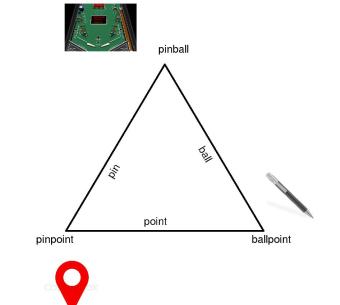
Each edge of the triangle is a word, and each vertex is a word made by joining the words on the two edges. For some reason, this seemed like the perfect problem to tackle with some self-joins.
If you want to see more examples and the ‘finished’ product, check out the twitter bot: https://twitter.com/WordTriangle
I’ve put the entire project (SQL script to generate triangles from a word list, Python 2 scripts to search google for images, draw the triangle, and post to twitter) on my github, but I’ll give a quick overview of the most important parts here.
SQL script:
(note that if you want to run this on a word list with more than ~10000 words, it takes some time)
I used this word list cleaned to exclude words that were shorter than 3 characters and lines that included spaces. This SQL script is written for sqlite3:
/*create and populate word list table*/
CREATE TABLE words(word TEXT);

.import wordlist_clean.txt words

/*select words that end with a string (longer than three characters) that is also found in the word list*/

CREATE TABLE b_in_a AS

SELECT SUBSTR(A.word,0,instr(A.word,B.word)) AS 'start', B.word AS 'ending', A.word AS 'word_A'

FROM words A, words B

WHERE LENGTH(ending) >= 3 AND A.word != ending AND A.word LIKE '%'||ending;

/*narrow down previous table to select words where both the beginnings and endings (both longer than three characters) are in the word list*/

CREATE TABLE split_words AS

SELECT * FROM b_in_a

INNER JOIN words ON b_in_a.start = words.word WHERE length(words.word) >=3;

/*select words that form a word triangle. Find words when the end of one is the beginning of another, then self join on the word list to see if the unused substrings also form a valid word.*/

SELECT DISTINCT C.W1||C.W2, C.W3, W.start||W.ending AS testW FROM

(SELECT A.start AS W1, A.ending AS W2,

CASE

WHEN A.start=B.ending THEN B.start||A.start

WHEN A.ending=B.start THEN A.ending||B.ending

END AS W3,

CASE

WHEN A.start=B.ending THEN B.start||A.ending

WHEN A.ending=B.start THEN A.start||B.ending

END AS W4

FROM split_words A, split_words B

WHERE A.start=B.ending OR A.ending=B.start)

AS C INNER JOIN split_words AS W ON testW=C.W4;
It’s a little hard to parse, but this script does a series of self-joins. First to tease out the single words that are made up of other words are in the original word list, second, to find pairs of split words that share a substring, and finally, to match the substrings that those pairs DON’T share with another valid word. Is SQL the best tool for this job? Probably not. Building a Trie from the word list should be much more efficient, but that is a project for another day.
Making the image:
To make the picture, I need the three words and the three substrings (which are also valid words). It turns out that I made my life a little more complicated than it needed to be. I should have selected the three substrings in addition to the words in the SQL script, but because I didn’t, I have to reconstruct them from the three words. I do this in the python script that makes and posts the image. Basically, this reverse engineers the process of making the words, splitting them up by substrings that two words share to find the third.
With the words in hand, I use the google custom search engine API to find the images. Many of the requests ended in error, so I set a limit on the number of attempts to download images for each word. If the search fails after 5 tries for any word, I post an image that already exists. Sometimes the images that are downloaded are not valid ‘.jpg’s, so I download two images per search, and hope that some random combination of images for the three words is valid. Again, if this fails after 5 attempts, I post a saved image.
Finally, I use Pillow to combine the three substrings, three words and images into one. Following this tutorial, I use tweepy to post the final image.
There’s still a bit to do on the automation side, but the most urgent functionality to add is a content filter. I use search for images with the safe search flag set to ‘high’, but that might not be enough. More fundamentally, even if all the words and images are kosher on their own, because the bot suggests implicit connections between the terms, between the images, and between the terms and images, I might be making statements that are problematic. While I search for a way to make sure that the bot’s posts are as innocuous as they’re meant to be, I will check the posts myself.
 Joseph Harder
You must be logged in to post a comment.